/
Project Management
Kill the "Franken-stack": The 5 Best PM Tools with Built-in Invoicing
Most Teams Don’t Lose Revenue Because They Fail to Deliver Work
They lose it because their systems don’t talk to each other.
When task management, time tracking, and invoicing live in separate tools, revenue leakage becomes almost inevitable. Every extra step between completing work and recording it increases the likelihood that billable time is missed, especially when teams are busy, deadlines are tight, and priorities constantly shift.
This is why more agencies are switching to project management tools with built-in invoicing that connect tasks, time tracking, and billing in one workflow.
Imagine this:
Your team completes several hours of client work inside Trello. Tasks are marked complete, collaboration happens, and progress moves forward. But later, when it’s time to log hours in Harvest, some of that work never gets recorded.
That missing time is revenue leakage. Work your business delivered, but never billed.
And forgotten time entries are only one part of the problem. Revenue leakage also happens when completed work isn’t fully tracked, documented, or invoiced. Missed tasks, unbilled expenses, scope creep, or services delivered without clear records all quietly eat into profitability.
The Financial Impact Adds Up Faster Than Most Teams Expect
Small gaps don’t feel expensive until you calculate them.
15 minutes per day × 5 days a week = 1.25 hours per week
1.25 hours per week × 52 weeks = 65 hours per year
At $100 per hour, that’s $6,500 lost annually from just one employee
Multiply that across a growing team, and those minor misses turn into a significant drain on revenue.
That’s why connecting task management, time tracking, and invoicing isn’t a nice to have. It’s essential. In this blog, we’ll break down the best project management tools with built in invoicing, the key features to look for in billing enabled tools, and how integrated workflows help capture every billable hour before revenue slips through the cracks
Key Features of Project Management Tools With Built-In Billing
When project management, time tracking, and invoicing operate in silos, billing becomes reactive and error-prone. The right tool should support agency time tracking by removing manual handoffs and making invoicing a natural extension of completed work.
Here are the most important features to consider when evaluating project management tools with built-in billing:
Native Timers (Not Plugins)
Built-in timers allow teams to track time directly inside tasks. Unlike external time tracking tools or plugins, native timers reduce friction and remove excuses for delayed or forgotten time entries. When time tracking is part of the task itself, billable work is captured as it happens.
Unbilled vs. Billed Filters
The ability to clearly see which tasks and hours have not yet been invoiced is critical. Unbilled filters surface revenue at risk, meaning work that has already been completed but has not yet been converted into cash. This makes invoicing faster, more accurate, and far less stressful at month end.
Payment Gateway Integration
A strong billing workflow doesn’t stop at sending invoices. Tools that integrate with payment gateways like Stripe or PayPal allow teams to collect payments directly from the platform. This shortens the payment cycle, improves cash flow, and reduces administrative overhead for both teams and clients.
Best Project Management Tools With Built-In Invoicing
Not all tools approach billing in the same way. Some prioritize time tracking, others focus on client operations, and a few are built specifically to connect execution with revenue. Below is a breakdown of the most commonly used options.
1. Teamcamp
Teamcamp is designed to eliminate revenue leakage by tightly connecting tasks, time tracking, and invoicing into one seamless workflow. Built with agencies in mind, including web studios, development teams, and marketing agencies, it ensures that every billable hour flows naturally from execution to billing without switching tools.
Strengths: Native timers, instant timelog-to-invoice conversion, client portal, stripe payment integrations, real-time dashboards.
Limitations: Reporting is strong for time and billing but less customizable than enterprise analytics tools
Best for: Client-facing agencies managing multiple projects, retainers, and recurring invoices
2. Teamwork
Teamwork is a long-standing platform built for agencies handling multiple clients and complex projects. It combines structured task management with time tracking and invoicing in a single system.
Strengths: Robust reporting, client dashboards, structured workflows
Limitations: User interface feels dated, and the task-to-invoice flow requires more manual steps
Best for: Traditional service and marketing agencies that prioritize structure and reporting over speed
3. Paymo
Paymo takes a time-first approach to billing. It allows teams to track hours, manage timesheets, and generate invoices with minimal setup. While it includes task management, the platform is optimized more for accurate time logging than complex project execution.
Strengths: Strong invoicing, simple time tracking, easy client billing
Limitations: Task and project management can feel limiting for larger or more complex teams
Best for: Freelancers, small teams, and creative studios focused primarily on billing accuracy
4. HoneyBook
HoneyBook is not a project execution tool. It’s a client operations platform focused on managing proposals, contracts, invoices, payments, and communication. It’s best viewed as a front-office system rather than a task-driven project management tool.
Strengths: Simple invoicing, contract management, streamlined client communication
Limitations: Weak support for task workflows and developer or agency-style project execution
Best for: Designers, photographers, consultants, and small creative businesses
5. Scoro
Scoro is a comprehensive business management platform that extends beyond project delivery into CRM, financial forecasting, and performance reporting. Billing is part of a broader operational system rather than a task-centric workflow.
Strengths: Advanced reporting, financial visibility, and business analytics
Limitations: Can feel complex and heavy for small or fast-moving teams
Best for: Large agencies or operations-focused businesses needing deep insights
Deep dive: The Teamcamp workflow
Teamcamp’s invoicing workflow is built to ensure that tracked work flows directly into billing without manual reconciliation or missed hours. Below is a step-by-step look at how the process works in practice.
Step 1: Choose the Client and Invoice Type
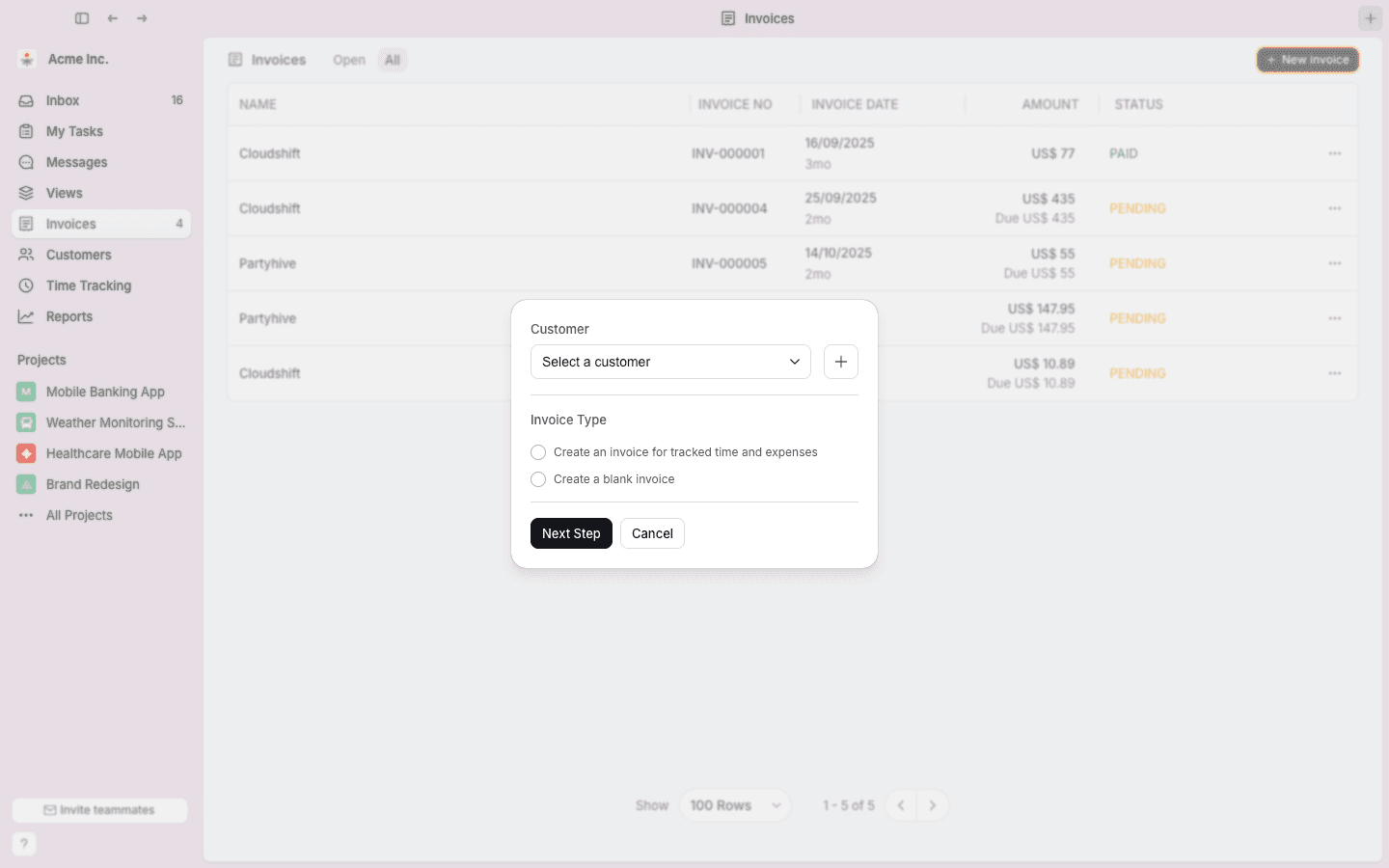
When creating a new invoice, the first step is selecting the client and defining how the invoice should be generated. Starting here ensures that all billing data stays connected to the correct client and project context.
Select the Client
Choosing a client instantly links the invoice to all related projects, tasks, and time entries. This prevents cross-client billing errors and ensures that all billable activity is attributed correctly from the start.
Choose the Invoice Type
Teamcamp supports multiple billing models depending on how work is priced:
Invoice tracked time and expenses
Automatically pulls billable hours and expenses from tracked work inside tasks and projects, keeping invoices aligned with actual delivery.
Create a blank invoice
Used for fixed-price projects or one-off services where billing isn’t tied directly to tracked time.
Defining both the client and invoice type upfront creates a clear source of truth and reduces confusion later in the billing cycle.
Step 2: Select Which Billable Hours to Include
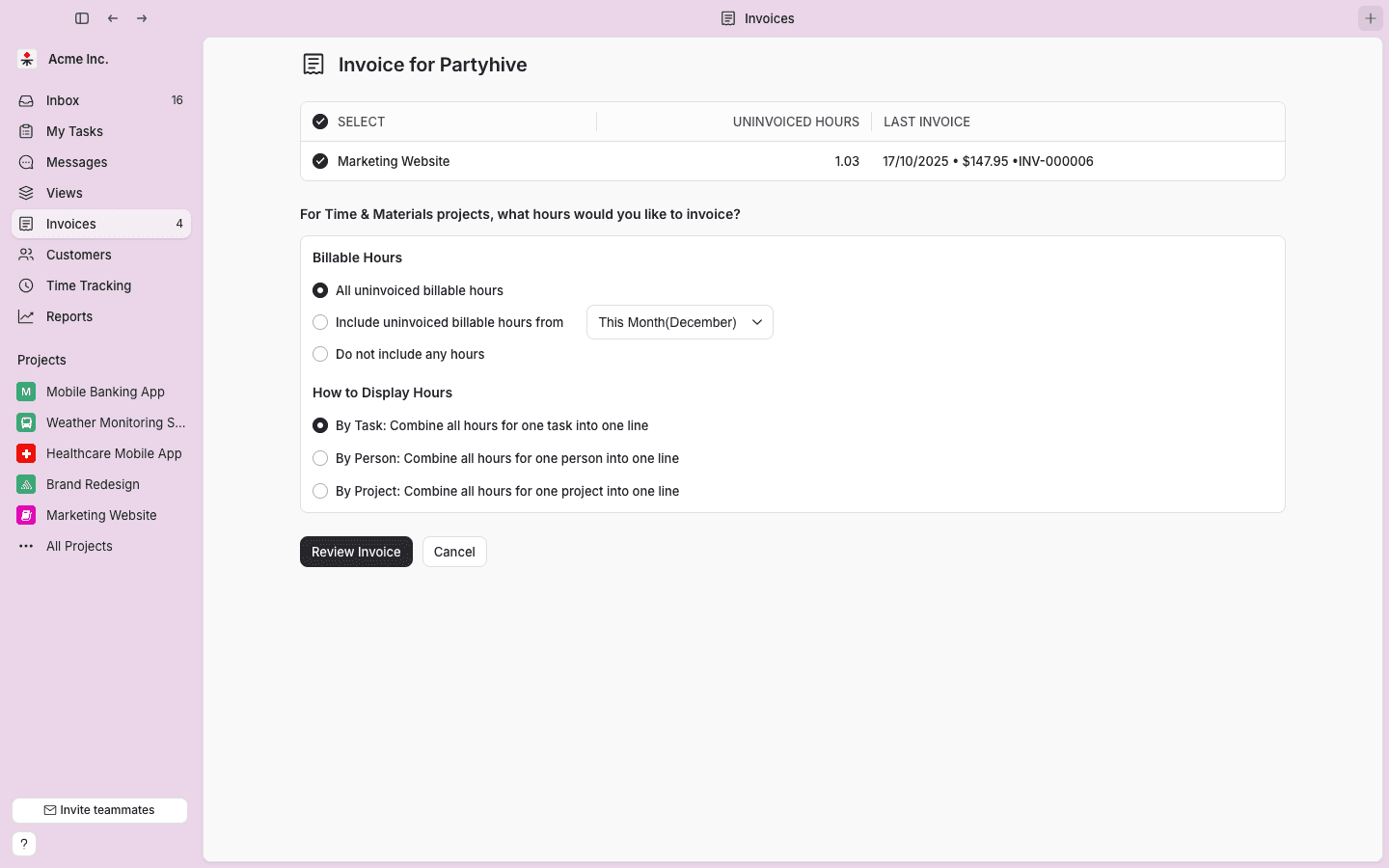
Once tracked time is selected for invoicing, Teamcamp focuses on exactly which hours should be billed. This is the stage where most revenue leakage typically occurs.
Teams can choose from several options:
All uninvoiced billable hours
Ensures that no completed work is missed.
Uninvoiced hours from a specific time period
Ideal for retainers, monthly billing, or milestone-based invoices.
Do not include hours
Used for fixed-fee or manually billed projects.
Teams can also control how time appears on the invoice. Time can be grouped by task, team member, or project, helping present work clearly to clients while maintaining billing accuracy.
Step 3: Finalize Invoice Details

After billable hours are added, teams can review rates, quantities, descriptions, and expenses while keeping everything connected to the original tracked work.
This step allows finance or project managers to fine tune invoices, catch inconsistencies, and ensure accuracy before sending invoices to clients. It reduces disputes and unnecessary back and forth.
Step 4: Review, Format, and Generate the Invoice
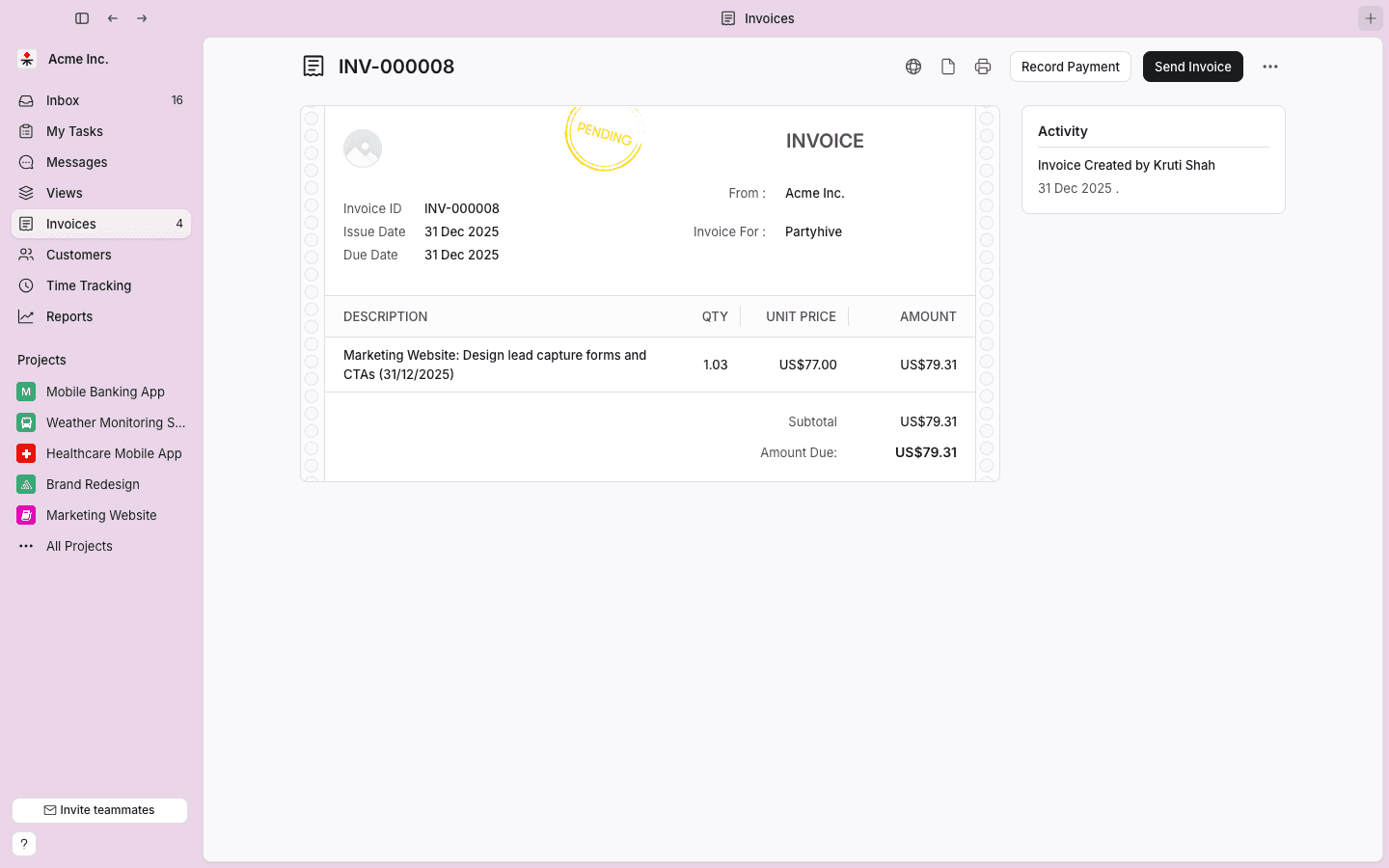
Once finalized, Teamcamp generates a clean, client-ready invoice with clear line items and totals. Teams can make last-minute edits and send invoices directly from the platform.
Because all data flows directly from tasks and tracked time, invoices are created faster and with greater confidence without cross-checking spreadsheets or switching tools.
Conclusion:
Even small gaps in time tracking and invoicing can quietly cost businesses thousands of dollars each year. Tools with native timers and task level traceability help ensure that every billable hour is captured.
Teamcamp’s integrated workflow from task to time tracking to invoicing reduces errors, shortens billing cycles, and keeps revenue predictable. Paymo and HoneyBook are solid options for smaller teams depending on workflow needs, but may overlap in functionality.
If your team tracks work in one tool, logs time in another, and invoices somewhere else using separate best invoicing apps, revenue leakage is almost guaranteed.Tools designed to connect execution directly to billing help close that gap before profits slip away.
Frequently Asked Questions (FAQ’s)
1. What’s the biggest billing mistake teams make with project management tools?
Relying on manual steps between completing work and invoicing it. When teams finish tasks in one tool and log time later in another, billable work gets delayed, forgotten, or never billed at all.
2. How does linking tasks to invoices improve transparency?
It allows clients to see exactly what work was completed, how many hours were spent, and how costs were calculated, building trust and clarity.
3. Why do “timesheets at the end of the week” cause lost revenue?
Because people don’t remember everything they worked on. End of week time logging leads to underreporting small tasks, quick fixes, and client requests exactly where revenue leakage starts.
4. Why is seeing “uninvoiced work” more important than total tracked hours?
Tracked hours only show effort. Uninvoiced hours show revenue at risk work that’s been done but hasn’t yet been converted into cash.