/
Agencies
The Modern Website Design Workflow: From Brief to Billable

Most website projects don’t fail because of bad design. They fail because the workflow silently breaks under pressure.
The brief looks clear. The design gets approved. Then development slows, edge cases appear, priorities shift, and suddenly delivery feels harder than it should. No single moment caused it; the cracks just widened over time. In agency-led projects, this is rarely a talent problem. It’s a structural one. Website delivery today spans strategy, content, design, development, and launch. When these decisions aren’t sequenced properly, momentum is lost even when everyone is doing their job.
This guide moves past surface-level advice. It shows how high-performing agencies structure work from brief to billable delivery, where execution typically breaks down, and how disciplined workflows prevent rework before it starts.
The Operating System Behind High-Performing Website Delivery
A website design workflow is not a checklist or a linear task list. In high-growth agencies, it becomes the “Operating System” that decides whether projects move forward cleanly or stall under unclear decisions.
High-performing agencies use workflow to define decision ownership, validation points, and handoffs between roles. Each phase exists to resolve a specific type of uncertainty before the next one begins. When this standard is unclear, execution depends on assumptions and informal approvals. Teams move forward without shared context, and issues surface only after effort has already been invested. A strong workflow creates consistency, allowing agencies to deliver complex websites without relying on individual heroics.
Why Workflow Fragmentation Is Your Biggest Risk
Project breakdowns rarely announce themselves. They surface when small gaps between phases are ignored until fixing them costs real time, money, and trust. Fragmentation happens when phases operate in isolation: Strategy moves ahead without content clarity; Design progresses without technical input; Development begins while decisions are still evolving.
These gaps introduce friction that compounds. Questions resurface late. Dependencies appear unexpectedly. A structured workflow reduces this risk by enforcing alignment early. Instead of reacting to problems downstream, elite teams prevent them upstream by closing decisions before moving forward.
The 9-Phase High-Performance Framework
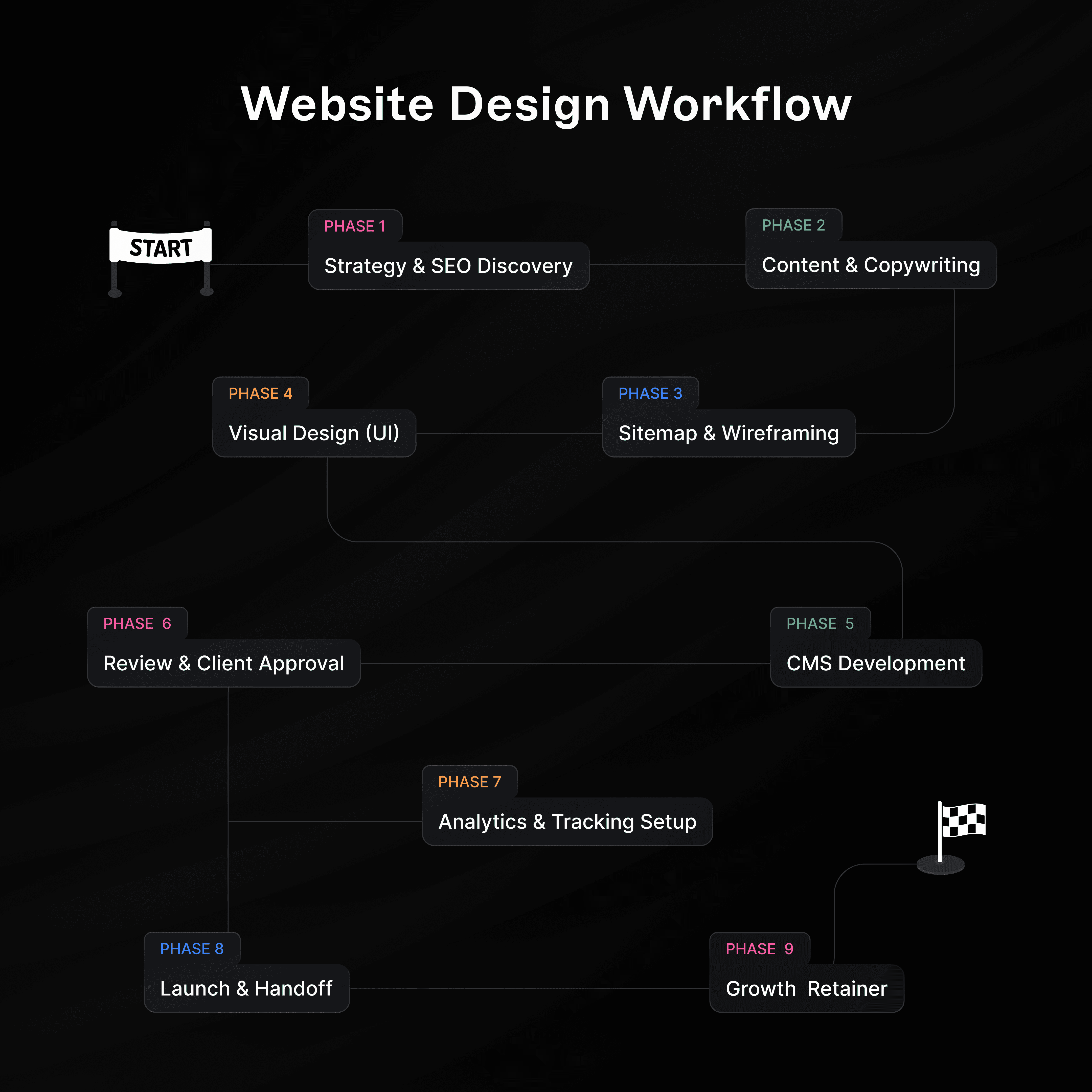
Phase 1: Strategy & SEO Discovery
This phase sets the commercial and strategic direction before any irreversible decisions are made. It’s where agencies either reduce risk early or unknowingly lock it into the project. It aligns business goals, audience intent, and market realities so the website is built with purpose, not assumptions. Without this "Strategy Shield," your team is just guessing with colors.
The Risk: Without a data-backed strategy, your project is vulnerable to "Subjective Feedback." If you don't define what success looks like now, the client will redefine it for you during the final review.
How It Works in Practice:
Competitor Benchmarking: Analyze 3–5 direct competitors to identify missed opportunities in their user journey.
Keyword Gap Analysis: Identify the specific search terms your client should be ranking for to inform the sitemap.
KPI Definition: Document exactly how many leads or conversions this site needs to generate to be considered a "win."
Recommended Tools:
Ahrefs / SEMrush: For analyzing competitor traffic and identifying high-value keyword gaps.
Teamcamp (Docs): For documenting the project brief and aligning stakeholders on KPIs before work begins.
Google Analytics: For benchmarking current performance to define what "success" looks like.
Phase 2: Content & Copywriting
Content is the backbone of the user experience. Planning copy early ensures messaging is consistent, persuasive, and aligned with brand identity. When content is planned before design, the UI becomes a vessel for the message rather than a decoration. Stakeholders respond to meaning instead of placeholders, which drastically reduces late-stage revision cycles.
The Risk: Designing with "Lorem Ipsum" is a recipe for disaster. You will inevitably find that the real copy is either too long for the container or too short for the layout, forcing a complete redesign in the final hour.
How It Works in Practice:
Message Mapping: Create a content outline for every page that aligns with the user’s stage in the funnel.
SEO Copywriting: Weave keywords into headers (H1, H2) naturally to ensure search engine visibility from day one.
The Final Polish: Secure formal sign-off on the written word before a single designer opens Figma.
Recommended Tools:
Teamcamp (Docs): For drafting content directly within the project context so designers see real copy, not "Lorem Ipsum."
SurferSEO: For scoring your content against top-ranking competitors to ensure it is optimized for search.
Google Docs: For real-time collaborative editing with external copywriters.
Phase 3: Sitemap & Wireframing
This phase defines the architectural logic before visual execution. Sitemaps confirm the scope of the build, while wireframes establish the user flow. By validating the structure early, you prevent the "Phase 5 Pivot", the moment when a client realizes a page layout doesn’t support their business logic.
The Risk: Skipping wireframes allows clients to get distracted by fonts and colors. You need them to approve the logic and navigation first so the foundation is rock-solid.
How It Works in Practice:
Sitemap Visualization: Use a tree-map to show how pages connect and how users will navigate through the site.
Low-Fidelity Wireframes: Create grayscale layouts that focus entirely on information hierarchy and CTA placement.
User Path Testing: Walk the client through a "clickable" wireframe to ensure the journey from home to checkout is frictionless.
Recommended Tools:
Relume: For generating sitemaps and wireframe components instantly to speed up the structural phase.
Teamcamp (Whiteboard): For collaborative brainstorming sessions to map out user flows alongside your task list.
Figma: For assembling the final wireframe layout before moving to high-fidelity design.
Phase 4: Visual Design (UI)
Visual design translates structure into a usable, high-end experience. High-performing teams don't just design "pages"; they build Design Systems. By defining reusable components and patterns, you ensure the site scales smoothly during development and maintains brand integrity across every device.
The Risk: One-off designs are impossible to maintain. If you don't build a system, every new page will require a custom build, eating your margins and creating a messy user experience.
How It Works in Practice:
Design System Creation: Establish a global library of typography, colors, button styles, and form inputs.
Responsive Breakpoints: Explicitly design how the UI shifts from a 27-inch monitor down to a 6-inch smartphone screen.
Interactive Prototyping: Build a high-fidelity prototype that mimics the actual feel of the finished website.
Recommended Tools:
Figma: The industry standard for interface design, prototyping, and building scalable design systems.
Midjourney: For generating unique, custom visual assets and mood board concepts rapidly.
Adobe Creative Cloud: For advanced photo editing (Photoshop) and vector illustration (Illustrator) that Figma can't handle.
Phase 5: Visual Development & CMS Build
This is where the vision becomes a functional product. Modern agencies have moved away from rigid templates toward visual development platforms like Webflow and Framer. The goal here is to build a pixel-perfect site that is also "client-proof" on the backend.
The Risk: "Spaghetti Classes." If your team builds without a naming convention (like Client-First), the site will break the moment the client tries to add a new blog post, destroying your margins with endless support tickets.
How It Works in Practice:
Scalable Class Systems: Use a strict naming convention for classes. This ensures that changing a button color on the Global Style Guide updates it everywhere instantly.
CMS Architecture: Build the backend logically. Connect dynamic content (Blogs, Team Members, Case Studies) so the client can publish new content by filling out a form, not by touching the layout.
Interactions & Polish: Implement scroll animations and hover states. This is the "delight" layer that separates a premium site from a template.
Recommended Tools:
Webflow / Framer: For visually building responsive, pixel-perfect sites with clean code and powerful CMS features.
GitHub: For managing version control of custom JavaScript or CSS code snippets.
Teamcamp (Tasks): For tracking build progress and ensuring every developed page is linked to a billable time log.
Phase 6: Review & Strategic Approval
Review phases protect your project’s momentum by formalizing decisions. Clear approval checkpoints ensure alignment before launch, not after bugs surface. This is the "Point of No Return" that prevents subjective loops and keeps revisions focused on the project’s original objectives.
The Risk: "Feedback Drift." Without a centralized review system, comments get lost in Slack, emails, and Zoom calls, leading to the team implementing the wrong versions of a change.
How It Works in Practice:
Staging Deployment: Push the site to a private URL where stakeholders can click every button in a safe environment.
Centralized Bug Tracking: Use a visual feedback tool so clients can pin comments directly onto the design.
The "Final Lock": Secure a digital signature on the final build before the DNS is pointed to the live server.
Recommended Tools:
Teamcamp (Client Portal): For sharing deliverables and securing formal, timestamped approvals to prevent scope creep.
MarkUp.io: For pinning visual comments directly onto the live staging site for pixel-precise feedback.
Loom: For recording video walkthroughs that explain complex functionality to the client asynchronously.
Phase 7: Analytics & Tracking Setup
Tracking establishes visibility and accountability from day one. Proper analytics ensure that performance, user behavior, and conversion outcomes are measurable. This phase prepares the agency to prove the ROI of the build and supports data-driven optimization in the future.
The Risk: Launching without tracking is like flying blind. If you can't prove the site is converting, the client won't see the value of your work, making it impossible to sell them a retainer later.
How It Works in Practice:
Conversion Mapping: Set up goals for every specific action (form submission, newsletter signup, click-to-call).
Heatmap Installation: Use session recording tools to see exactly where users get confused or frustrated.
Dashboard Delivery: Provide the client with a simple, high-level dashboard that shows them their most important metrics at a glance.
Recommended Tools:
Google Tag Manager: For managing tracking pixels and event tags without needing to touch the codebase.
GA4 (Google Analytics 4): For tracking user behavior, traffic sources, and conversion events.
Hotjar: For recording user sessions and heatmaps to identify where users are dropping off.
Phase 8: Launch & Handoff
Launch is a transition, not a finish line. This phase ensures technical stability and operational clarity for the client. A professional handoff reduces "support debt", the weeks of unbillable emails following a launch and protects the agency’s long-term credibility.
The Risk: A "Ghost Launch." If you launch and disappear, the client will feel abandoned the moment they have a question, turning a successful project into a sour relationship.
How It Works in Practice:
The Big Switch: Manage DNS and SSL certificates to ensure the site goes live with zero downtime.
Client Empowerment: Record personalized Loom videos showing the client how to manage their new CMS.
Project Wrap-Up: Deliver a "Handoff Folder" containing all final assets, credentials, and documentation.
Recommended Tools:
Cloudflare: For managing DNS settings and ensuring fast, secure content delivery globally.
Teamcamp (Files): For hosting training videos, brand assets, and guidebooks in a permanent library for the client.
GoDaddy / Namecheap: For domain management and final DNS propagation checks.
Phase 9: Growth & Iteration
Websites require ongoing optimization to remain effective. This phase focuses on refinement based on real usage data. Iteration allows the site to evolve as business goals change, turning a one-off project into a long-term, billable partnership.
The Risk: Stagnation. A website that isn't updated starts losing its SEO value and conversion edge within 6 months.
How It Works in Practice:
Monthly Performance Audits: Review analytics to see which pages are underperforming and why.
A/B Testing: Experiment with different button colors or headlines to see which drives more clicks.
Continuous Content Updates: Keep the site fresh with new case studies, blogs, and team updates to signal "life" to both users and Google.
Recommended Tools:
Teamcamp (Recurring Tasks): For automating monthly maintenance checklists like "Plugin Updates" or "SEO Reporting."
Sentry: For monitoring the live site for JavaScript errors so you can fix bugs before the client notices.
Teamcamp (Invoicing): For automatically billing the monthly retainer fee based on the tracked maintenance work.
Common Workflow Mistakes to Avoid
Even experienced teams struggle when discipline slips. These traps compound across phases and eat your margins:
Skipping Discovery: Starting UI without a locked strategy leads to "guessing with colors."
Vague Scope: If it isn't documented as a deliverable, it’s a "favor" that costs you money.
Fragmented Communication: When feedback lives in five different places, context (and profit) is lost.
No Early Tech Input: Designing something that can't be built within the budget is a waste of time.
Rushing QA: A buggy launch kills client trust faster than a late launch.
Conclusion
Strong websites aren’t the result of individual heroics or late-night "fixes." They are the result of a controlled sequence of decisions made with precision and purpose. When execution follows a clear structure, projects become easier to manage, easier to repeat, and significantly more profitable for everyone involved. Ultimately, a disciplined workflow transforms website design from a reactive effort into a repeatable framework for high-value delivery.
Frequently Asked Questions (FAQ’s)
1. How do we stop feedback loops from stalling the project?
Stop asking open-ended questions like "what do you think?" and start using centralized review portals like Teamcamp. By pinning feedback directly to specific design elements in a staging environment, you turn vague opinions into clear, actionable tasks and eliminate the endless back-and-forth.
2. Why is a unified tool stack better for our bottom line?
Every time your team has to hunt for info across different apps, you lose billable time to context switching. Having a single source of truth for strategy, assets, and communication protects your profit by keeping the team focused on billable work instead of searching for files.
3. How do we stop scope creep from eating our profits?
Scope creep usually happens when the discovery phase is too weak. When you have a locked-in strategy and a signed-off sitemap, every new request becomes a formal change order with its own price tag, rather than a free favor that kills your margin.
4. Won't 9 phases make the delivery process too slow?
It actually makes it faster. A mistake caught during wireframing takes minutes to fix, but that same mistake found during development can take hours or days to undo. This framework allows you to move deliberately at the start so you can launch without expensive rescue missions at the end.
5. Can a small team actually manage 9 phases?
Small teams actually need these phases more than large ones. Without the budget to absorb the cost of rework, these stages act as your insurance policy. They ensure every hour your team spends is moving the project toward the finish line, not backward into revisions.